Showing posts with label video. Show all posts

5/04/2017

CONTENT CREATION TOOL

This easy tool will become a FAVE for educators!

Just ran across this FREE new app called "Apple Clips" that I think will blow away teachers! It has a simple interface, no complicated madness, and allows you to create simple videos that create captions automatically (can be edited too). I think it is worth checking out. I watched this video podcast from TeacherCast by Jeffery Bradbuty that explains more details. Then I read more information in the Apple Store. By the way, the dictation feature will not work on older ipads or devices.
=======================================================

Special thanks to Teacher Cast for sharing great tools for educators!


https://youtu.be/zRfQnsqZPoc

http://www.teachercast.net/2017/04/14/apple-clips-app-review/

Review: Apple Clips App for iOS - teachercast.net
www.teachercast.net
Apple Clips is a new video broadcasting experience that provides easy to use resources when editing video ... but is it the right tool for your classroom?

5/24/2016

Meaning of Memorial Day


PBS Learning Media has selected some videos to help us learn the true meaning of Memorial Day, highlighting ones on soldiers, veterans, and war. These would be perfect to use in the classroom and have students in groups to share what they have learned with other classmates. I know many  teachers at this time of year are trying to focus on the end of school and keep students engaged and busy. What a meaningful activity to focus on those who have sacrificed their lives so that we can have our freedom (at a cost). Take the time to check out their "Stories of Service".Note the grade level under each video! This is only appropriate for Grades 4 - 12.

10/23/2015

Monster Match Skype Event

Just concluded our Skype "Monster Match" event with two first grade classes who are 30 miles apart, different schools, yet same District.  Our main goal was to give the teachers experience with Skype before using Skype in the Classroom. Here is an explanation of our F-U-N event for you to try.

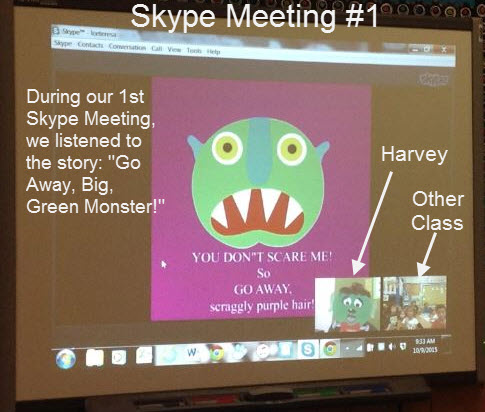
I served as the Facilitator and introduced myself as "Harvey Monster" with mask.
I introduced the classes to each other and on the first meeting, gave the classes their instructions to create their OWN class monster. They will name their monster and reveal the name next meeting. At the end of this meeting, I shared one of my 'monster friends' and listen to the reading of "Go Away Big, Green Monster!" by Ed Emberley which was on YouTube.
Objectives covered:  shapes, colors, how to follow directions, how to write directions, body parts, creativity, how to follow directions
Meeting #1  October 9 (1:15 pm) 
This was a short meeting to say hello. Each class created monsters with colored shapes. (No more than 10 shapes from colored construction paper) This was a class project and each class had to keep track of the steps it took to create their CLASS Monster. For instance, the size of construction paper (12X18 or 9X12) used for each body part; how you fold it (hamburger fold or hotdog fold) where to cut it, tape it, or glue it; where to draw eyes, etc. 

Meeting #2 October 16 (1:15 pm)
Now that the Class Monster(s) are complete and each class wrote out Step-by-Step instructions for the OTHER Class to follow, we had our 2nd meeting. Each class gave out their Monsters' names: we had a Rainbow Rosie and Freddie Monster. The teachers selected students to read out each step for the other class to hear how to make the monster.  It worked great on sentence strips to hold up as students read them aloud. (I had the teachers email the instructions to each other also) We gave out our good luck wishes on Making their Monster match and set the next meeting date. Classes had a week to create the matching monster. 
(Teachers selected students to read sentence strips with directions for making their Class Monster. The students shared the names of their Monsters and at this stage: Do NOT show your monster yet! During this meeting, I had students use foam dice in their classes and we followed the Dice Drawing Sheet that I shared on the screen to draw a monster. Classes took turns throwing the dice to get the certain feature to draw. I tweaked the drawing sheet idea to make it quick and easy for first graders. The students LOVED this activity!
Meeting #3 October 23 (1:15 pm)

This was the BIG SHOWing, where each class revealed their Class Monster and we compared them on the screen! I had the teachers email me an image of their Monsters, so that I could place it on the screen, next to the one they made. I snipped a picture so I could email them a picture of the two Monsters side-by-side of each other. We used the remainder of time to play an online Tic-Tac-Toe game and had students watch a video that showed them how to make a Monster corner bookmark. Here are our Matching Monsters! Didn't they do a great job?

3/17/2015

Cyber Bullying Virus

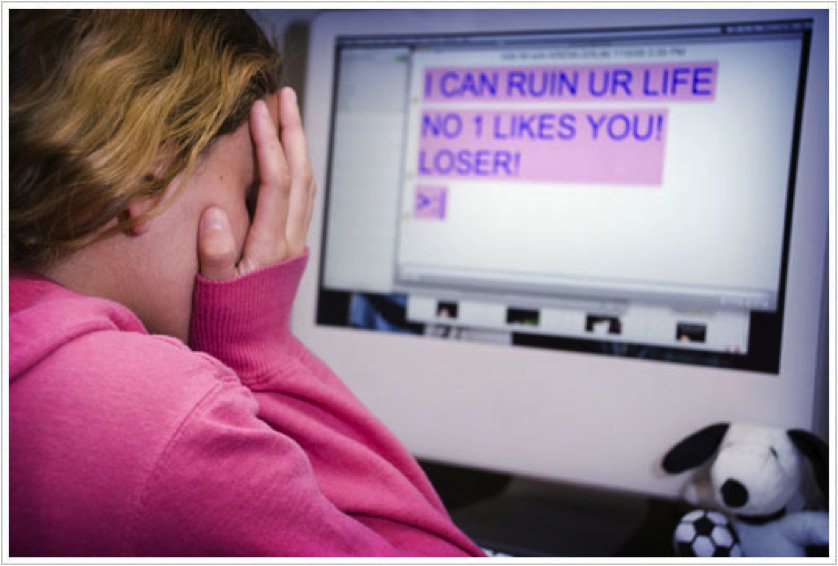
This is one of the best videos to share with older students on the harmful effects of cyber bullying. I think you will agree. Strutt Central did an excellent job creating this and helping us to see the dangers. I love the acronym that is viral on the Internet:

THINK


3/04/2015

Need Writing Help for ELA?


Thanks to Jenny Sawyer, who created the resource called 60 Second Recap, we have a great place to go for writing assistance online. The site highlights her books and is geared for students ages 14 - 19. She shares hundreds of 60 second Book Reviews that surely will inspire readers to read more. I can see where a teacher could share several of these during class and then require students to create their OWN 60 second review. Mrs. Sawyer gets funds by having book purchased from her site after viewing the recap. What a small reward for this awesome learning resource! She has links to study guides on many classics that are popular. What is great that you don't want to miss are her recap videos on each classic book. She is so passionate about her material during these clips; you can really see how easy it is to learn from her. She has a section called the Essay Coach where she shares the process in 4 steps for writing an essay. There you can see her book titles and she shares the introductions to each of them for you to get a feel about the books. If you want a snippet of her teaching style, check out this lesson on creating a thesis statement in four steps. I watched it and wish I were back in school so I could redo my English assignments. Do not skip out on her resource page, where she has 60 second videos on Literary terms, and how to create your OWN recap video. Don't take my word for it, check out Jenny Sawyer's website!

1/14/2014

Writing Event of the Year Happens Tomorrow


Hope you don't miss this great event for kids! You can have you class watch tomorrow, or they allow you to catch it again later. Looks like a sure way to encourage and motivate students in  writing.
Here's a short trailer about the event. They give three ingredients for writing a good story. Kids LOVE Jeff Kinney and Dav Pilkey's books on the Diary of a Wimpy Kid and Captain Underpants. Hope you will be able to join the fun.


12/05/2013

Seasonal Break

Well, I apologize for being away for a spell, but you can say I truly enjoyed my break for the holiday and look forward to the next one. I have so much to be thankful for and love this season. Maybe that's why God chose this season for my birthday LOL. I was blessed with a new grandson (number 6 grandchild) born on November 29th, which had us traveling to Austin for his birth. There's just nothing like snuggling with a newborn baby. I miss him already, but do have to get back to work.

This week in all my thankfulness, I thought I would share this heartfelt poem to educators from +Peter Reynolds. He and his brother have the company Fablevision and have now created a new one called TLC: Teaching, Learning, & Creativity I like the sound of that because isn't that's what we are all about in education? Check out their Mission Statement on the site. I just know that this will be yet another great project from Peter and Paul Reynolds. Please go here to fill out the form on the Keepers of the Flame and tell your own story of how you inspired a student. You never know if it will be chosen and published!
Thank you educators for all you do:

11/04/2013

PopBoardz

New presentation app for iPad! Allows you to import content from Dropbox, Email, from iPad, add pdfs, videos, JPEGS, and even entire websites. Organize and Transform your information with popboardz!

6/24/2013

Myladibug Video

Voting begin June 3 – June 17 and winners will be announced tomorrow, June 24th. Stay tuned to the video that was selected for their innovative use of the Lumens document camera.   Myladibug Video

3/20/2013

Vimeo's Enhanced Editor


Check out Vimeo's video editor!
A new Look in just a few clicks
For those who don't know how to use advanced editing software (or just want to have some fun), you can make any of your videos more visually appealing in just a few clicks with our Looks Enhancer, powered by Vivoom.
Give your video an analog film vibe, change the color, or create a wild effect - there are hundreds of Looks to choose from, and they're all free for a limited time. And if you need music, the Enhancer has you covered too!
Ready to give your video a new Look?